Keyboard Shortcuts
Clipcat is designed to be fast. The most common actions are just a key combo away, no mouse required.
System-wide Shortcuts
These work from any application on your system, even when Clipcat is hidden or minimized to the tray.
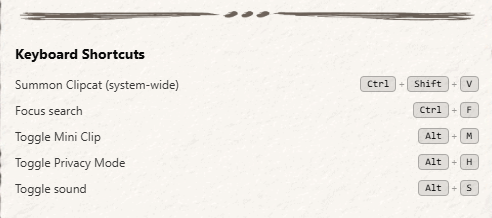
| Shortcut | Action |
|---|---|
| Ctrl+Shift+V | Summon Clipcat (Windows / Linux) |
| ⌘+Shift+V | Summon Clipcat (macOS) |
In-app Shortcuts
These work when the Clipcat window is focused.
| Shortcut | Action |
|---|---|
| Ctrl+F / ⌘+F | Focus the search bar (toggles the collapsible bar in Mini Clip / Quick Paste mode or on small screens) |
| Ctrl+K / Ctrl+Shift+P | Open the command palette |
| Alt+M | Toggle Mini Clip mode |
| Alt+H | Toggle Privacy Mode (blur all clips) |
| Alt+S | Toggle sound effects |
Tips
- Quick Paste workflow: Press Ctrl+Shift+V to summon Clipcat while in any app, click a clip, and it pastes into the window you were just using.
- Command palette: Press Ctrl+K to toggle every major feature without reaching for the mouse.
- Search from anywhere: Once Clipcat is open, Ctrl+F jumps focus to the search box immediately. On small screens or in Mini Clip mode it toggles a collapsible search bar.
- Mini Clip toggle: Alt+M is persistent - Mini Clip state saves between sessions. It also auto-enables Always on Top so the compact window floats above other apps.