Environments
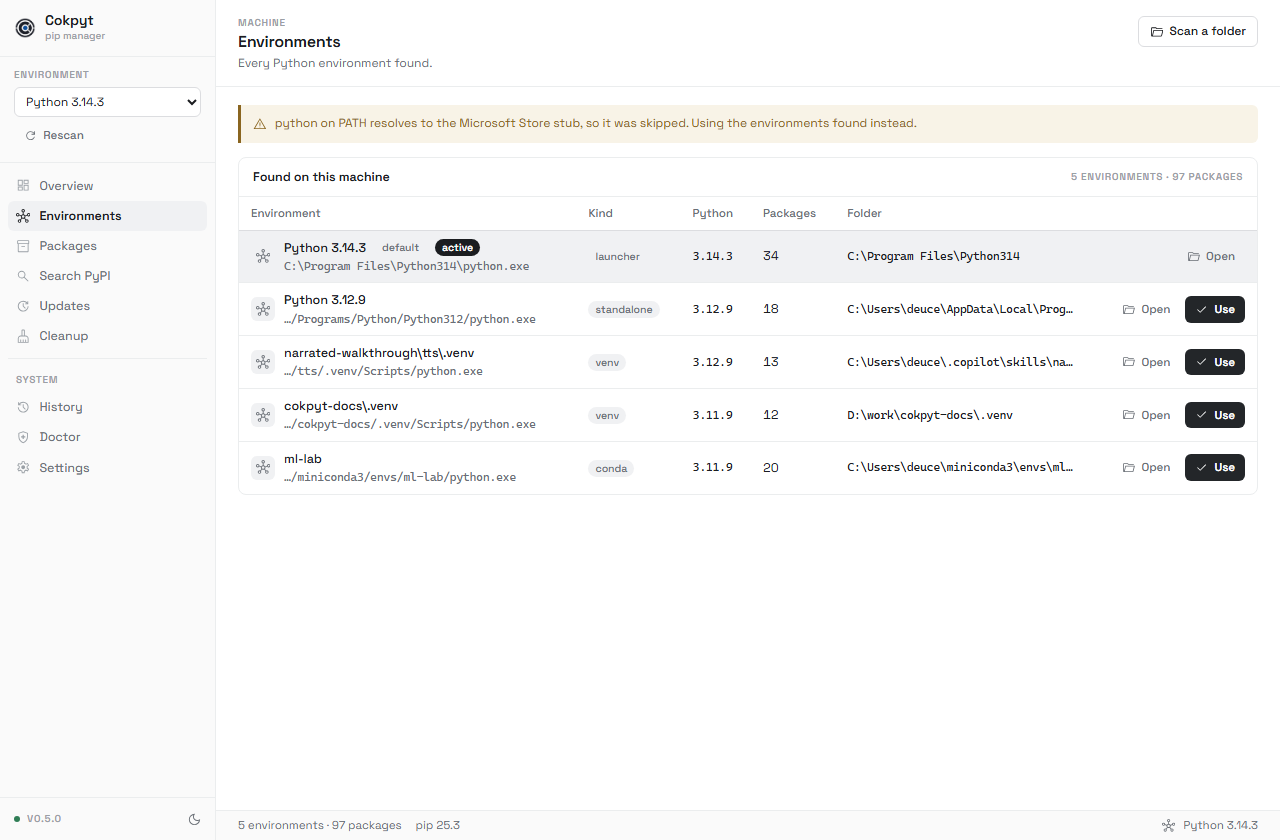
pip list reports the packages of one interpreter. A project's packages live in its own venv, not in the base install. Cokpyt inventories every environment it can find.
What gets found
| Holder | How it is found |
|---|---|
A runtime the py launcher installed | py -0p |
| A runtime a python.org installer dropped | the usual install directories, including %LOCALAPPDATA%\Programs\Python |
| A virtual environment | a pyvenv.cfg file at its root |
| A conda environment | a conda-meta directory at its root |
Reading a row
The name, how it was found, its Python version, how many packages it holds, and where it lives.
| Badge | Meaning |
|---|---|
launcher | Tracked by the Python Install Manager (py) |
standalone | Found in an install directory; py does not know about it |
venv | Virtual environment |
conda | Conda environment |
default marks the runtime the launcher would pick. active marks the one every other page is working in.
A freshly created venv has no packages. Zero is a fact, not a failure.
Switching environment
Pick one in the sidebar, or click Use on its row. The choice is remembered. If that environment is later deleted, Cokpyt falls back to the launcher's default runtime rather than leaving every page pointed at nothing.
Scan a folder
Scan a folder walks a directory you choose for pyvenv.cfg and conda-meta markers and adds what it finds. Useful for projects on another drive.
Rescan
Rescan re-inventories the machine. Cokpyt also rescans on its own before reporting an environment missing, so this is only needed after creating an environment while the app is open.