Introduction
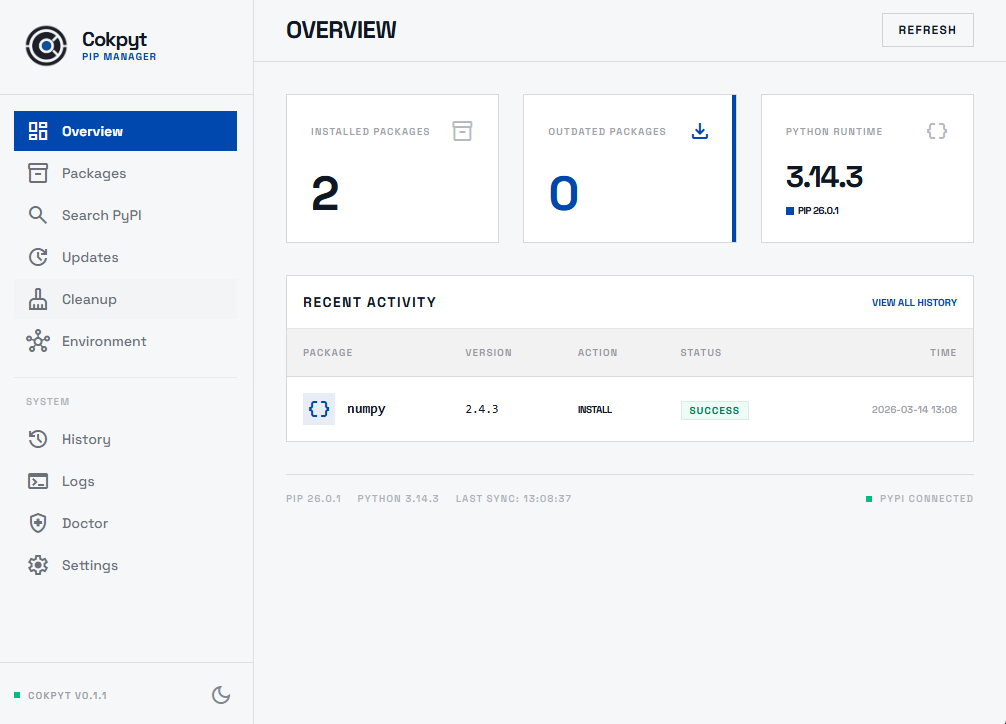
Cokpyt is a lightweight, fast desktop application that gives you a complete graphical interface over pip and the PyPI ecosystem - without ever touching the command line.
Why Cokpyt?
You work in Python. You use pip. But every time you need to manage your packages you are back in a terminal window, squinting at walls of text and trying to remember whether it was pip list --outdated or pip list -o.
Cokpyt is the GUI you always wished pip shipped with.
Built with Go and React on top of the Wails framework, it puts your entire Python environment on a clear dashboard. Browse every installed package, search all of PyPI, install and upgrade and uninstall with a click, run a full environment health check, and see a logged history of every pip action you have ever taken.
Feature Overview
| Feature | What it does |
|---|---|
| Dashboard | Real-time overview of your environment: total packages, pending updates, Python & pip versions, recent activity |
| Installed Packages | Browse, filter, install, uninstall, and bulk-manage every package in your environment |
| Updates | See every outdated package with version diffs; upgrade one, a selection, or all at once |
| Search | Query PyPI instantly and install any result with one click |
| Doctor | Health check for Python, pip, and PyPI connectivity with actionable fix hints |
| History | Permanent audit trail of every install, upgrade, and uninstall with timestamps |
| Cleanup | Reclaim disk space by clearing pip caches, .egg-info dirs, and __pycache__ folders |
| Logs | Raw pip output streamed live; filterable by keyword and severity after the fact |
| Environments | Register, switch between, and manage Python virtual environments |
| Settings | Toggle light/dark theme and replay the guided tour |
Tech Stack
Cokpyt is built on a modern, open-source stack:
- Wails v2 - Go backend, web frontend, one native binary per platform
- React + TypeScript - frontend UI
- TanStack Query - data fetching and cache invalidation
- Tailwind CSS - utility-first styling
Next Steps
- Installation - download the binary or install via
pip - Dashboard - first page you'll see when you open the app
- Contributing - set up a dev environment and send a pull request