Search
The Search page lets you query the entire PyPI index in real time and install any result directly from the app - no separate browser tab or terminal window needed.
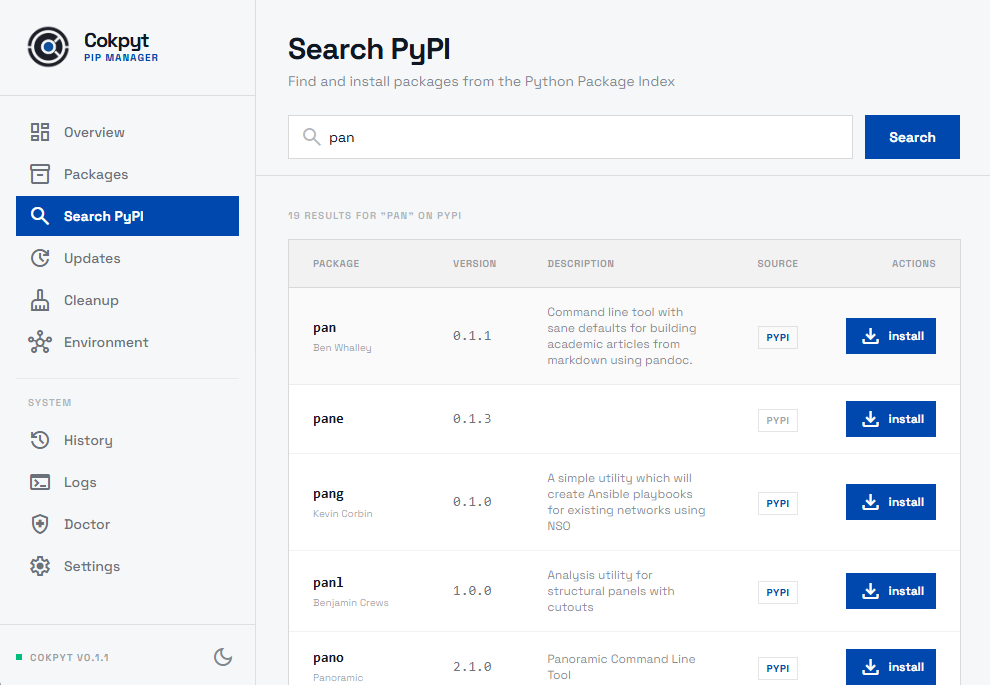
Searching PyPI
Type any package name or keyword into the search box and press Enter (or wait for the auto-search to trigger). Cokpyt queries the PyPI Simple/JSON index and returns a list of matching packages.
Result Cards
Each result shows:
| Field | Description |
|---|---|
| Name | Package name as it appears on PyPI |
| Version | Latest published version |
| Description | Package summary from PyPI metadata |
| Install button | One-click install |
Installing a Search Result
Click the Install button on any result card. Cokpyt runs pip install <package> and a live terminal panel slides in at the bottom of the screen to show the output. The button disables while the install is in progress to prevent duplicate runs.
Once installed, the package appears on the Installed Packages page.
Tips
- Exact name search - searching for the full package name (e.g.
requests) gives the most precise results. - Keyword search - broader terms (e.g.
http client) return multiple packages, useful when you are evaluating alternatives. - Version pinning - installing from Search always installs the latest version. To install a specific version, use the pip install dialog on the Installed Packages page and add a version specifier (e.g.
requests==2.28.0).